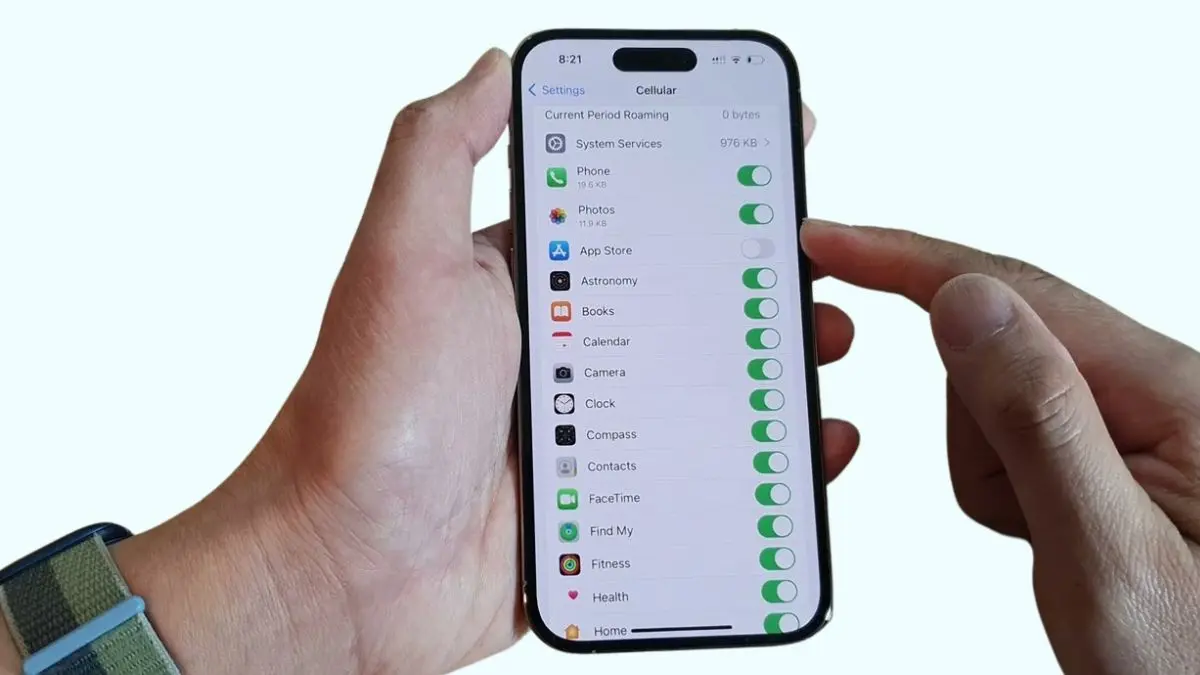
Every day we get annoyed when the mobile data limit runs out on iPhone. But we are not aware of one thing that how to set mobile data limit on iPhone? Don’t worry, here are the solutions.
We use mobile data on iPhone according to the plan recharged in the SIM card. Almost all recharge plans have a daily limit. If the daily data limit is over, we can no longer use the data. It can be solve by setting a data limit. The steps for set mobile data limit on iPhone are slightly different from Android. So let’s follow the steps given below on how to set mobile data limit on iPhone.
1. Open Settings
Find the Settings icon on the iPhone screen or app drawer. Settings icon probably looks like a gear sign. Touch the icon when it appears at display.
2. Select Cellular or Mobile Data
After touching Settings icon, scroll down & find out Cellular or Mobile Data and touch on it.
3. Use Data Limit or Data Usage Settings
Mobile data setting provides various options about mobile data usage. Look for that can set data limits or monitor data usage. On iPhone this options may also have different names based on the iOS operating system. After finding the option (either Data Limit or Data Usage) turn it on. This can enable data limit feature on iPhone.
4. Set Data Limit
After turning on data limit, set the required data limit. Limits can be set on a specific period such as daily, monthly, weekly or a limit can be customize. Select the desired amount of data in MB or GB which are called as Megabyte and Gigabyte to set a custom limit according to the daily data limit.
5. Set Data Alert
Along with setting data limits, data alerts must be turned on to receive alerts when iPhone’s mobile data is crossing the limit. It helps monitor usage so that user can make adjustment as needed. In the same setting menu, an option is available to set data alerts. Enable that option to choose the percentage or amount of remaining data where the alerts will be received.
6. Monitor Data Usage
Once data limits and alerts are set, data usage monitoring on iPhone can begin. From here, go back to cellular settings, users can see the current data usage and the amount of data used by all apps one by one on iPhone. So it is possible to identify and modify which apps or activities are using the most data.
7. Reset Data Usage
Reset data usage is needed to monitor iPhone’s data usage from starting period or a specific period of time. Users have to scroll down to the bottom of the cellular settings menu and find the option to reset statistics and touch this option to clear iPhone data usage history. After that data usage history will be freshly start again.
The steps of setting a data limit for iPhone is a very simple and effective. It is the only way to manage the data usage and avoid unexpected charges. By following the steps described above, anyone can easily set a data limit, configure a data alert and monitor data usage on an iPhone. This is an effort by Techno Minda technicians in the hope that all iPhone users can enjoy a worry-free mobile experience by setting mobile data limits on iPhone. If you are facing another problem such as iPhone 15 pro issues, we have solved it you can check it out.
Thanks for reading till the end. Always stay updated with Techno Minda. Our Technical Experts are always ready to help you for any issues. If you have any problem don’t hesitate to ask in comment section. We will try to find out best solution for you. Kindly share this page with your relatives, friends and family & help us to create a big helpful community.





Great tips! I didn’t realize setting a mobile data limit could be so easy on my iPhone. This will definitely help me manage my data usage better. Thanks for sharing!
Great tips! I didn’t realize how easy it was to set a data limit on my iPhone. This feature will definitely help me manage my data usage better. Thanks for sharing!
Thanks for your support, we will try to solve more problems like this
Great tips on managing mobile data! I didn’t know the feature existed until now. Setting a limit will definitely help me avoid overage charges. Thanks for sharing!
For more updates visit again Techno Minda
Great guide! I never knew how easy it was to set a mobile data limit on my iPhone. This will really help me manage my data usage better. Thanks for sharing!
Thanks for the helpful tips! I didn’t realize setting a data limit on my iPhone was so easy. This will definitely help me manage my data usage better. Keep up the great work, Techno Minda!
Great tips! I had no idea about the data limit feature on my iPhone. This will definitely help me avoid unexpected charges. Thanks for sharing!
Great article! I found the step-by-step instructions really helpful, especially for someone who often forgets to monitor their data usage. Thanks for breaking it down so clearly!
Thank you for this detailed guide! I’ve been struggling to manage my mobile data effectively, and your step-by-step instructions made it really easy to set a limit on my iPhone. I appreciate the tips and screenshots!
Great article! I just followed your steps to set a mobile data limit on my iPhone, and it worked perfectly. This feature will definitely help me keep my data usage in check. Thanks for the clear instructions!
Great post! The step-by-step guide made it really easy to set my data limit. I love how I can now monitor my usage and avoid overage charges. Thanks, Techno Minda!
Great tips! I never realized setting a mobile data limit could help me manage my usage better. Thanks for explaining the steps so clearly!
Great tips! I never knew setting a mobile data limit on my iPhone was so easy. This will definitely help me manage my data usage better. Thanks for the clear instructions!
Great post! I had no idea setting a mobile data limit on my iPhone was so easy. The step-by-step instructions were really clear. Thanks for sharing!
This post was super helpful! I never knew how to set a data limit on my iPhone until now. Thanks for the clear instructions!
Great tips! I didn’t realize setting a mobile data limit on my iPhone was so easy. This will definitely help me manage my data usage better. Thanks, Techno Minda!
Great post! I found your step-by-step instructions on setting a mobile data limit really helpful. It’s nice to have control over data usage, especially with how quickly it can add up. Thanks for sharing!
Great post! I finally figured out how to manage my data usage effectively. The step-by-step instructions were really helpful. Thank you, Techno Minda!
Great post! I finally set my mobile data limit after struggling with it for so long. The step-by-step instructions were super helpful. Thanks for sharing!
Great tips! I had no idea I could set a data limit on my iPhone. This will definitely help me manage my usage better. Thanks for sharing!
Great guide! I’ve been looking for ways to manage my data usage better, and this post really helped clarify the steps on my iPhone. Thank you, Techno Minda!
Great tips! I never knew setting a mobile data limit on my iPhone was so easy. This will definitely help me manage my data usage better. Thanks, Techno Minda!
Great post! I didn’t realize setting a mobile data limit was so easy on my iPhone. Your step-by-step guide was super helpful. Thanks for sharing!
Great tips! I didn’t realize how easy it is to set a mobile data limit on my iPhone. This will definitely help me manage my data usage better. Thanks for sharing!
Thanks for the detailed guide! I’ve always struggled to manage my mobile data effectively, and your step-by-step instructions made it so easy to set a limit on my iPhone. I appreciate the screenshots too—they really helped clarify the process.
Great tips! I never knew about this feature until now. Setting a data limit will definitely help me avoid unexpected overage charges. Thanks for the clear instructions!
Great tips! I never knew how easy it was to set a data limit on my iPhone. This will definitely help me manage my usage better. Thanks for sharing!
Thanks for this helpful guide! I didn’t realize how easy it was to set a mobile data limit on my iPhone. This will definitely help me manage my data usage better. Keep up the great work, Techno Minda!
Great article! I never knew setting a data limit on my iPhone was so easy. The step-by-step instructions were super helpful. Thanks for sharing!
Great post! I always struggled with tracking my mobile data usage, but the steps you provided made it super easy to set a limit on my iPhone. Thank you for the clear instructions!
Great post! I had no idea it was so easy to set a mobile data limit on my iPhone. This will definitely help me manage my data usage better. Thanks for the clear instructions!
This is my first time visit at here and i am really impressed to
read all at one place.
Great post! Setting a mobile data limit on my iPhone has made a huge difference in managing my usage. The step-by-step guide was really easy to follow. Thanks, Techno Minda!
Great article! I always forget to monitor my data usage, so setting limits on my iPhone is a game changer. The step-by-step guide made it really easy to follow. Thanks for sharing!
Great guide! I wasn’t aware of the mobile data limit feature on my iPhone. This will definitely help me manage my data usage better. Thanks, Techno Minda!
Great post! Setting a mobile data limit is such a useful tip, especially for those of us who often exceed our data. I appreciate the clear instructions and screenshots. Thanks for sharing!
Great tips! Setting a mobile data limit is super helpful, especially for managing my usage. I didn’t realize there were so many ways to customize it. Thanks for the clear instructions!
Great post! I had no idea setting a mobile data limit was so easy. Your step-by-step guide was super helpful, especially for someone like me who tends to go over the data limit every month. Thanks for sharing!
Great post! I never knew setting a mobile data limit on my iPhone could be this easy. Your step-by-step guide made the process so clear. Thanks for sharing!
Great tutorial! I had no idea I could set a mobile data limit on my iPhone. This will really help me manage my data usage better. Thanks for sharing these clear steps!
Thank you for this detailed guide! I never knew I could set a data limit on my iPhone. This will definitely help me manage my usage better. Appreciate the tips!
Thanks for the detailed guide! I always struggled with managing my mobile data, but your steps make it so straightforward. Just set my limits, and I can finally keep track of my usage more effectively. Appreciate the tips!
Great post! I wasn’t aware of the option to set a data limit on my iPhone, and it’s going to help me manage my usage better. Thanks for the step-by-step guide!
Great post! Setting a mobile data limit is such a useful tip for managing data usage. I followed the steps you outlined, and it was so easy. Thanks for the clear instructions!
Great guide! I’ve been looking for a way to manage my data usage better, and your step-by-step instructions made it so easy to set a limit on my iPhone. Thanks for the helpful tips!
Great post! I didn’t know setting a mobile data limit was so easy on my iPhone. Your step-by-step guide was super helpful. Thanks for sharing!
Great tips! I’ve been struggling with my mobile data usage, and your step-by-step guide made it so easy to set a limit on my iPhone. Thanks for sharing!
Great tips! I’ve been struggling with keeping my data usage in check. The step-by-step instructions were super helpful, especially the part about setting a schedule for my data limits. Thanks, Techno Minda!
Great guide! I had no clue about setting a data limit on my iPhone. The step-by-step instructions were really helpful. Thanks, Techno Minda!